
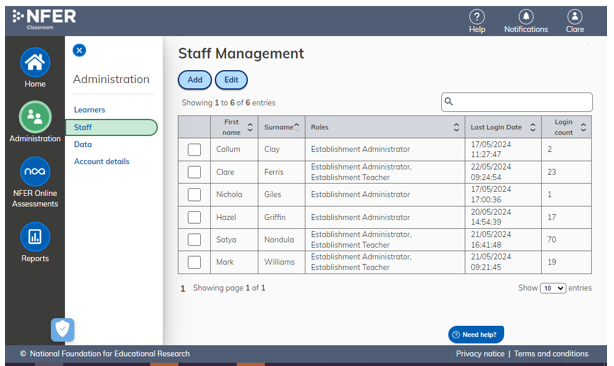
- Log into the NFER Reporting Tool and select Administration from the left-hand side menu.
- Select Staff.
- Select Add.
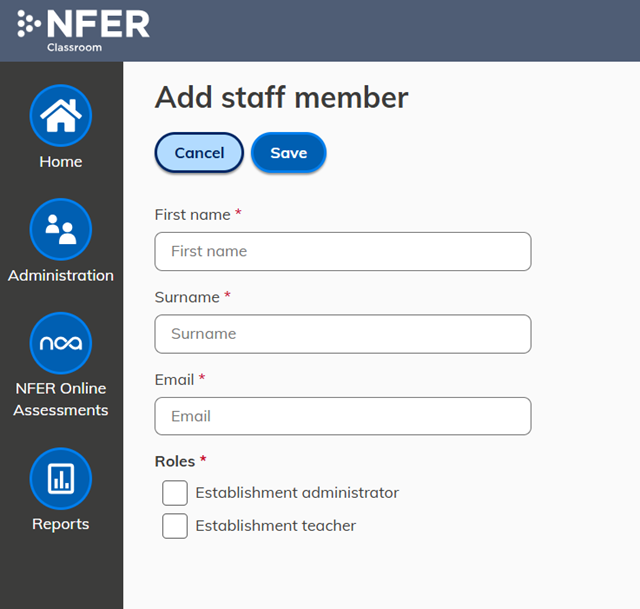
- Enter the new staff details:
- First name
- Surname
- Email address
- Role
- Save
Roles
An Administrator can perform all tasks on the system
A teacher can:
- Select Learners to work with using the Learner selection feature.
- Enter and edit test data
- View reports for their selected learners.
A teacher is unable to:
- Add, edit or delete learners or staff members as they will not have access to the Administration icon.
Logging In
Once a staff member has been added they will receive an email asking them to create a password, so they are able to log into the system.
Was this article helpful?
That’s Great!
Thank you for your feedback
Sorry! We couldn't be helpful
Thank you for your feedback
Feedback sent
We appreciate your effort and will try to fix the article