
The Detailed diagnostic reports provide an in-depth analysis for a proportion of questions in an assessment. The analysis is based on different responses given by learners in the standardisation trials. Questions have been selected for discussion based on the diagnostic information they provide such as learner misconceptions, common errors, or learner understanding of key skills and content. Where possible, suggestions for developing learner knowledge and understanding are provided, and in the case of maths, links to the Ready-to-progress criteria are given if relevant.
The contents page lists all the questions discussed in the report, and the page numbers are hyperlinked to take you directly to the page for that question. The curriculum area for each question is also provided, as in the other NOA reports. For reading these correspond directly the Key Stage 2 content domain strands. For maths each area covers several strands. A detailed breakdown of the curriculum areas can be found here:
Curriculum areas and codes - reading
Curriculum areas and codes - maths

Each page of the report shows the question being discussed. There may be slight differences from the learner view in the assessment due to spacing. The correct response is indicated on the question in green, for closed response question types. While reading the commentaries for the teacher marked questions it may be helpful to have the corresponding mark scheme open to view, and for the reading tests, a copy of the text.
Both reading texts and the teacher marked question mark schemes can be accessed as follows:
- Select NFER online assessments icon from the left menu bar.
- Select Marking.
- On the Test selection page select the assessment for which you wish to view the report
- Click on the Mark scheme button and then Print to print out the mark scheme if required
- For Reading assessments only, click on the Text button to download a copy of the reading text, which can either be saved or printed.
To access the Detailed diagnostic reports:
- Select the Detailed diagnostic report icon from the report screen in NOA, there is a choice of reports from which to select.
- Once selected, the report will automatically download as a PDF file, which can then be saved or printed as required.
Additional information about the reports
Multiple choice question options are discussed in the order they appear in the question. The correct response may therefore not appear as the first response.
For questions with commentaries on several common errors, these generally are presented in order of frequency but occasionally are listed in order of how close the response is to being correct.
The percentages giving each response will rarely total 100%. This is because the commentaries focus on the most common errors made by learners and there will be learners who did not give these responses or who may have omitted the question.
For some commentaries learners may fall into more than one category. For example, in a reading question a learner may have given a partially correct response. The learner could then be counted within the 1 out of 2 mark answers, as well as in a common error commentary describing a particular mistake made by both learners scoring 1 mark or 0 marks for the question.
In reading some commentaries may show a green tick as well as a red cross:
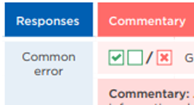
For an example like this, the common error was given by learners who either scored 1 out of the possible 2 marks for this question, or no marks. This is typically due to the question requiring two separate responses.
Was this article helpful?
That’s Great!
Thank you for your feedback
Sorry! We couldn't be helpful
Thank you for your feedback
Feedback sent
We appreciate your effort and will try to fix the article